
ChatGPT का ’80s वाला फ़ोटो ट्रेंड क्या है? वायरल रेट्रो AI पोर्ट्रेट कैसे बनाएं?
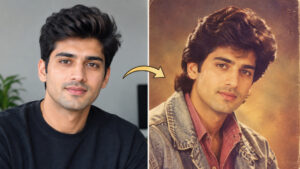
अगर आपने हाल के दिनों में Instagram या दूसरे social media platforms पर ऐसी तस्वीरें देखी हैं जिनमें लोग अचानक 1980s के fashion, hairstyle और पुराने कैमरा लुक में नजर आ रहे हैं, तो आप अकेले नहीं हैं। ChatGPT 80s photo trend ने सितंबर 2026 में सोशल मीडिया पर काफी ध्यान खींचा है। इस trend में लोग अपनी सामान्य selfie या portrait को AI की मदद से ऐसा रूप दे रहे हैं, जैसे वह तस्वीर कई दशक पहले खींची गई हो।
इसका खास हिस्सा केवल तस्वीर पर पुराना filter लगाना नहीं है। AI फोटो में कपड़े, hairstyle, lighting, background, pose और film texture जैसे elements को बदलकर पूरी तस्वीर का 1980s-inspired माहौल तैयार किया जा सकता है। यही वजह है कि अलग-अलग users अपनी photos को अलग-अलग retro styles में experiment कर रहे हैं।
ChatGPT 80s Photo Trend क्या है?
आसान भाषा में समझें तो यह एक AI image-editing trend है जिसमें आपकी मौजूदा फोटो को reference के रूप में लेकर उसे 1980s के visual style में बदला जाता है। आप ChatGPT को अपनी फोटो देकर बता सकते हैं कि आपको किस तरह का retro look चाहिए।
इसमें बड़े और पुराने जमाने के hairstyles, vintage कपड़े, warm lighting, studio photography, film grain, पुराने रंगों की feel और period-style background जैसे elements शामिल किए जा सकते हैं। हालिया reports के अनुसार social media पर users इसी तरह modern selfies को 1980s-inspired portraits में बदल रहे हैं।
यह सामान्य Instagram filter से थोड़ा अलग है। Filter आमतौर पर पूरी तस्वीर पर एक visual effect लगाता है, जबकि AI editing में आप image के अलग-अलग हिस्सों को निर्देश देकर बदलवा सकते हैं।
ChatGPT से 80s AI Photo कैसे बनाएं?
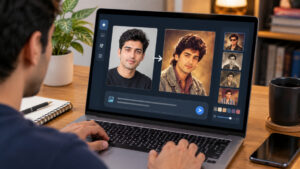
ChatGPT में existing photo को edit करने के लिए आप अपनी image upload करके उसके साथ स्पष्ट instructions दे सकते हैं। OpenAI के अनुसार ChatGPT Images नई तस्वीरें बनाने के साथ existing images को edit भी कर सकता है। आप सीधे conversation में image upload करके बदलाव का निर्देश दे सकते हैं।
प्रक्रिया काफी आसान है:
1. एक अच्छी quality वाली फोटो चुनें
ऐसी फोटो इस्तेमाल करें जिसमें चेहरा साफ दिखाई दे और lighting बहुत खराब न हो। Front-facing portrait, हल्की natural lighting और पर्याप्त resolution वाली तस्वीर आमतौर पर बेहतर reference देती है।
अगर चेहरे का कुछ हिस्सा बहुत ज्यादा छिपा हुआ है, फोटो बहुत blur है या उसमें कई लोग हैं, तो desired result पाने में मुश्किल हो सकती है।
2. फोटो ChatGPT में upload करें
ChatGPT में अपनी फोटो जोड़ें और फिर बताएं कि आप इसे 1980s-inspired portrait में बदलना चाहते हैं। OpenAI की वर्तमान जानकारी के अनुसार existing image upload करके उसके बदलाव का वर्णन किया जा सकता है।
आप केवल “इसे 80s photo बना दो” लिखने के बजाय थोड़ा detailed instruction दें। इससे clothing, lighting, background और overall mood पर बेहतर control मिलता है।
3. अपना 80s AI photo prompt दें
उदाहरण के लिए यह prompt इस्तेमाल किया जा सकता है:
“इस फोटो में व्यक्ति के चेहरे और पहचान को यथासंभव consistent रखते हुए इसे 1980s के Indian studio portrait जैसा बनाएं। 1980s के hairstyle और fashion, vintage clothing, warm studio lighting, subtle film grain, slightly soft focus, authentic analog camera texture और classic retro background रखें। तस्वीर realistic लगे, modern smartphone photo जैसी न लगे। चेहरे के natural features को अनावश्यक रूप से न बदलें।”
यह एक starting prompt है। आप इसमें अपनी पसंद के अनुसार outfit, background, colour tone और photography style बदल सकते हैं।
बेहतर 80s AI Photo के लिए Prompt में क्या लिखें?
अच्छे परिणाम के लिए prompt में केवल “retro” लिखना पर्याप्त नहीं होता। आपको यह बताना चाहिए कि तस्वीर का final mood कैसा होना चाहिए।
| Element | Prompt में क्या बताएं |
|---|---|
| Clothing | 1980s vintage shirt, saree, jacket या period-style outfit |
| Hairstyle | Voluminous retro hairstyle या decade-appropriate haircut |
| Lighting | Warm studio light, soft flash या vintage portrait lighting |
| Background | Classic photo studio, living room या period-inspired setting |
| Camera look | Analog photography, subtle film grain |
| Colours | Warm, slightly faded vintage tones |
| Composition | Portrait, waist-up या full-body |
| Realism | Natural skin texture और realistic facial features |
इस तरह AI को केवल एक broad style नहीं, बल्कि तस्वीर के अलग-अलग visual elements के बारे में भी direction मिलता है। OpenAI की image-generation guidance भी descriptive prompts में subject, setting, style, composition और जरूरी constraints स्पष्ट करने की सलाह देती है।
80s Photo Trend में कौन-कौन से Styles आजमा सकते हैं?
एक ही prompt को बार-बार इस्तेमाल करने के बजाय अलग-अलग retro themes आजमाना इस trend का सबसे मजेदार हिस्सा है।
1. Classic Indian Studio Portrait
इसमें 1980s के traditional Indian studio portrait जैसा look बनाया जा सकता है। Warm background, formal clothing, vintage hairstyle और soft studio lighting तस्वीर को पुराने family-album जैसा feel दे सकते हैं।
2. Retro Bollywood-Inspired Look
अगर आप cinematic look चाहते हैं तो period-inspired fashion, dramatic lighting और vintage studio background शामिल कर सकते हैं। हालांकि किसी वास्तविक celebrity की exact identity या copyrighted promotional image को reproduce करने के बजाय generic 1980s-inspired styling रखना बेहतर है।
3. Family Album Style
यह सबसे natural options में से एक है। Prompt में faded colours, subtle grain, simple indoor background और पुराने analog camera की feel जोड़कर तस्वीर को family album जैसा बनाया जा सकता है।
4. 1980s Street Fashion
इस style में vintage jacket, patterned shirt, classic sunglasses, period-appropriate hairstyle और outdoor street setting जैसी चीजें शामिल की जा सकती हैं। इससे final image studio portrait की बजाय candid retro photograph जैसी दिख सकती है।
चेहरा बदलने से कैसे बचाएं?
AI-generated portraits में सबसे बड़ी समस्या यह हो सकती है कि व्यक्ति का चेहरा original photo से अलग दिखाई देने लगे। इसलिए prompt में साफ लिखें कि facial identity, face shape, skin tone और प्रमुख facial features को यथासंभव consistent रखा जाए।
इसके साथ reference photo भी अच्छी होनी चाहिए। बहुत low-resolution image या heavily filtered selfie से AI को सही facial details समझने में कठिनाई हो सकती है।
अगर पहला result सही नहीं आता, तो पूरी तस्वीर दोबारा generate करने के बजाय targeted correction मांगें। उदाहरण के लिए आप कह सकते हैं कि hairstyle बदलें लेकिन चेहरा और clothing composition को पहले जैसा रखें। ChatGPT Images में generated image के specific हिस्सों को edit करने की सुविधा भी उपलब्ध है।
केवल Prompt नहीं, Reference Photo भी महत्वपूर्ण है
कई लोग सोचते हैं कि एक शानदार 80s AI photo बनाने के लिए सबसे महत्वपूर्ण चीज prompt है। वास्तव में prompt और source photo दोनों की भूमिका होती है।
अगर original image अच्छी quality की है, चेहरा साफ है और subject पर्याप्त रोशनी में है, तो AI के पास काम करने के लिए बेहतर visual information होती है। इसके विपरीत बहुत dark, blurry या अत्यधिक edited photo से परिणाम inconsistent हो सकता है।
एक practical तरीका यह है कि पहले साफ portrait upload करें और फिर एक ही बार में बहुत ज्यादा बदलाव मांगने के बजाय दो या तीन चरणों में look refine करें।
क्या 80s AI Photo में Privacy का ध्यान रखना चाहिए?
हाँ। Viral trend होने के बावजूद personal photo upload करते समय privacy को नजरअंदाज नहीं करना चाहिए। किसी भी AI service पर निजी तस्वीर upload करने से पहले उसकी privacy और data-handling settings को समझना उचित है।
खासकर ऐसी तस्वीरें upload करने से बचें जिनमें sensitive documents, घर का पता, पहचान संबंधी जानकारी या दूसरे लोगों की निजी जानकारी दिखाई दे। हालिया coverage में इस trend के संदर्भ में users द्वारा uploaded images के data handling को लेकर privacy concerns भी उठाए गए हैं।
अगर किसी दूसरे व्यक्ति की फोटो इस्तेमाल कर रहे हैं, तो उनकी अनुमति लेना भी बेहतर है। AI से किसी व्यक्ति की तस्वीर बदलना technically आसान हो सकता है, लेकिन इसका मतलब यह नहीं कि हर image को बिना अनुमति इस्तेमाल करना उचित है।
80s AI Photo Realistic क्यों नहीं दिखती?
अगर generated image बहुत ज्यादा artificial लग रही है, तो इसके कई कारण हो सकते हैं। Prompt बहुत generic हो सकता है, source image कमजोर हो सकती है या आपने एक साथ बहुत सारे conflicting instructions दे दिए हों।
बेहतर result के लिए prompt में “realistic analog photography”, “natural skin texture”, “subtle film grain”, “period-appropriate clothing” और “authentic 1980s studio lighting” जैसे स्पष्ट visual instructions इस्तेमाल किए जा सकते हैं।
लेकिन हर बार AI exactly वैसा result देगा, यह जरूरी नहीं है। Generated image में hands, jewellery, clothing details, facial proportions या background elements में छोटी-मोटी inconsistencies रह सकती हैं। इसलिए final image को publish या share करने से पहले ध्यान से देखना चाहिए।
क्या यह सिर्फ Instagram Trend है?
नहीं। Instagram पर इसकी visibility काफी अधिक है, लेकिन 1980s AI photo trend केवल एक social-media filter तक सीमित नहीं है। Users अलग-अलग AI image-generation और editing tools की मदद से retro portraits बना रहे हैं और फिर उन्हें Instagram Stories, posts और दूसरे platforms पर share कर रहे हैं।
इस trend की लोकप्रियता का एक कारण यह भी है कि इसमें technology और nostalgia दोनों साथ आते हैं। आज की selfie को देखकर यह कल्पना करना कि वही व्यक्ति 1980s के fashion और photography style में कैसा दिखाई देता, एक simple लेकिन highly shareable visual idea बन जाता है।
ChatGPT 80s Photo Trend के लिए 5 Practical Tips
पहला, साफ और अच्छी quality वाली portrait photo इस्तेमाल करें।
दूसरा, prompt में सिर्फ “80s look” न लिखें। Clothing, hairstyle, lighting, background और film texture भी specify करें।
तीसरा, चेहरे को consistent रखने के लिए facial features न बदलने की स्पष्ट instruction दें।
चौथा, पहले result को final मानने के बजाय छोटे targeted edits से image refine करें।
पांचवां, image share करने से पहले यह जांच लें कि उसमें unwanted text, distorted hands, unnatural facial details या दूसरी visual errors तो नहीं हैं।
FAQs
ChatGPT 80s photo trend क्या है?
यह एक AI image trend है जिसमें modern photo को 1980s-inspired portrait में बदला जाता है। इसमें vintage clothing, hairstyles, lighting, backgrounds और analog film effects जैसे elements जोड़े जा सकते हैं।
ChatGPT में 80s AI photo कैसे बनाएं?
ChatGPT में अपनी photo upload करके बताएं कि उसे 1980s retro portrait में बदलना है। बेहतर result के लिए clothing, hairstyle, lighting, background और film texture के बारे में स्पष्ट prompt दें। ChatGPT Images existing photos को edit करने की सुविधा देता है।
क्या बिना prompt के 80s photo बनाई जा सकती है?
कुछ मामलों में केवल natural-language instruction से भी image transformation किया जा सकता है, लेकिन detailed prompt देने से desired style पर ज्यादा control मिल सकता है।
क्या AI original चेहरा पूरी तरह same रख सकता है?
AI कोशिश कर सकता है कि reference image के facial features को consistent रखे, लेकिन हर generated result में exact identity preservation की guarantee नहीं होती। इसलिए final image को ध्यान से check करना जरूरी है।
क्या 80s AI photos share करना safe है?
Personal photo upload करते समय privacy और data-handling policies को समझना जरूरी है। Sensitive information वाली images upload न करें और दूसरे व्यक्ति की तस्वीर इस्तेमाल करने से पहले उनकी अनुमति लेना बेहतर है।
निष्कर्ष
ChatGPT 80s photo trend ने यह दिखाया है कि AI image generation केवल नई तस्वीरें बनाने तक सीमित नहीं है। एक सामान्य selfie को 1980s के fashion, lighting, hairstyle और analog photography के visual language में बदलकर पूरी तरह अलग तरह का portrait बनाया जा सकता है।
अच्छे result के लिए किसी एक “magic prompt” पर निर्भर रहने के बजाय साफ reference photo, स्पष्ट instructions और छोटे-छोटे edits का इस्तेमाल करें। सबसे महत्वपूर्ण बात यह है कि AI द्वारा बनाई गई तस्वीर को realistic मानने से पहले उसकी details जांचें और personal photos share करते समय privacy का ध्यान रखें।
यदि आप इस trend को आजमाना चाहते हैं, तो एक अच्छी portrait photo से शुरुआत करें और पहले classic 1980s studio look बनाकर देखें। इसके बाद clothing, background और photography style बदलकर अपनी पसंद का retro AI portrait तैयार किया जा सकता है।