
How to Create Ads in Google VEO 3: AI से Ad Video कैसे बनाएं
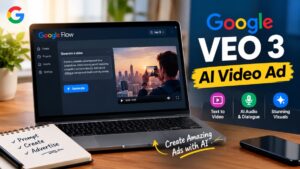
Google VEO 3 की मदद से अब बिना traditional video shooting setup के भी short और creative advertisement videos तैयार किए जा सकते हैं। अगर आपके पास किसी product, service, YouTube channel या business के लिए ad का idea है, तो generative AI की मदद से उसे video concept में बदला जा सकता है।
aiVeo 3 की खास बात यह है कि यह सिर्फ visuals बनाने तक सीमित नहीं है। Google के अनुसार Veo video के साथ dialogue, sound effects और ambient audio भी generate कर सकता है। Google ने इसे Gemini और अपने AI filmmaking tool Flow में उपलब्ध कराया है।
इस guide में हम समझेंगे कि Google VEO 3 से advertisement video कैसे बनाया जा सकता है, एक अच्छा ad prompt कैसे लिखें, product को video में कैसे दिखाएं और किन common mistakes से बचना चाहिए।
Table of Contents
- Google VEO 3 क्या है?
- AI से advertisement video बनाने के लिए क्या चाहिए?
- Google VEO 3 से Ad Video कैसे बनाएं?
- एक अच्छा Advertisement Prompt कैसे लिखें?
- Product Ad का Example
- बेहतर AI Video के लिए Practical Tips
- Google VEO 3 की Limitations
- FAQs
- Conclusion
Google VEO 3 क्या है?
Google Veo, Google DeepMind का generative AI video model है, जिसे text और अन्य inputs से video बनाने के लिए design किया गया है। Veo 3 में video के साथ native audio generation को भी प्रमुख capability के रूप में पेश किया गया था। इसमें dialogue, sound effects और background/ambient sounds को prompt के आधार पर generate किया जा सकता है।
इसी वजह से यह traditional AI video generator से थोड़ा अलग workflow देता है। उदाहरण के लिए, आप केवल यह नहीं लिखते कि “एक coffee advertisement बनाओ”, बल्कि product, location, camera movement, lighting, character और audio को भी describe कर सकते हैं।
हालांकि एक बात समझना जरूरी है। Veo 3 खुद Google Ads campaign manager नहीं है। इसका इस्तेमाल मुख्य रूप से ad creative या advertisement video बनाने के लिए किया जाता है। तैयार video को बाद में अपने advertising platform पर इस्तेमाल किया जा सकता है।
AI से Advertisement Video बनाने के लिए क्या चाहिए?
AI video tools का इस्तेमाल शुरू करने से पहले आपको अपने advertisement का basic concept clear रखना चाहिए। सबसे पहले यह तय करें कि आप किस product या service का promotion कर रहे हैं।
इसके बाद यह सोचें कि video किस audience के लिए है और advertisement देखने के बाद आप viewer से क्या action चाहते हैं। उदाहरण के लिए product को explore करना, website visit करना या किसी offer के बारे में जानना।
Google का Flow AI filmmaking के लिए बनाया गया है और इसमें Veo models के साथ text-to-video, frames और reference ingredients जैसी सुविधाएं उपलब्ध हैं। Feature availability और supported models समय तथा region के अनुसार बदल सकते हैं।
Google VEO 3 से Ad Video कैसे बनाएं?
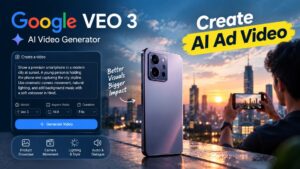
अगर आप Google VEO 3 से advertisement creative बनाना चाहते हैं, तो सबसे पहले Google के supported Veo/Flow workflow में जाएं। Flow में नया project शुरू करके video generation के लिए prompt दिया जा सकता है। Google के current Flow interface में video model, aspect ratio, outputs और generation length जैसे options उपलब्ध हो सकते हैं।
Step 1: Advertisement का Concept तय करें
सबसे पहले यह तय करें कि ad में क्या दिखाना है। मान लीजिए आप एक premium smartphone का advertisement बनाना चाहते हैं।
आपका basic concept कुछ ऐसा हो सकता है:
“एक युवा व्यक्ति सुबह के समय शहर की सड़क पर smartphone इस्तेमाल कर रहा है और phone का camera beautiful sunrise capture करता है।”
यह सिर्फ starting idea है। अच्छे output के लिए इससे ज्यादा detail देना बेहतर रहता है।
Step 2: Product और Scene को Describe करें
Prompt में product की appearance और environment को clearly describe करें।
उदाहरण के लिए smartphone ad में आप phone का design, camera module, background, lighting और overall mood बता सकते हैं।
अगर आप किसी specific product की visual consistency चाहते हैं, तो available reference/ingredient features का उपयोग किया जा सकता है। Google Flow में reference images और ingredients के जरिए characters तथा objects को generation में guide किया जा सकता है।
Step 3: Camera Movement लिखें
Advertisement को professional feel देने के लिए camera direction भी prompt का हिस्सा होना चाहिए।
जैसे:
“slow cinematic push-in”,
“close-up product shot”,
“smooth tracking shot”
या
“wide establishing shot”.
Google की Veo prompt guide भी shot framing और camera motion को prompt में clearly describe करने की सलाह देती है।
Step 4: Lighting और Visual Style बताएं
इसके बाद video की lighting और style तय करें।
उदाहरण:
“premium commercial photography, soft morning light, realistic reflections, cinematic depth of field”
इस तरह की information AI को advertisement का visual direction समझने में मदद करती है।
Step 5: Audio और Dialogue Add करें
Veo 3 की महत्वपूर्ण capabilities में generated audio भी शामिल है। Prompt में dialogue, background sound और sound effects का description दिया जा सकता है। Google की official prompt guide में audio cues और dialogue को prompt के अंदर define करने के examples दिए गए हैं।
उदाहरण:
“Background में हल्की city ambience हो और character natural Hindi में कहे, ‘हर पल को और बेहतर तरीके से capture करें।’”
ध्यान रखें कि generated speech या audio का output हमेशा perfect होना जरूरी नहीं है। इसलिए final creative को publish करने से पहले ध्यान से review करना चाहिए।
एक अच्छा Advertisement Prompt कैसे लिखें?
AI video generator से अच्छा result लेने में prompt की quality बहुत महत्वपूर्ण होती है। केवल “एक product का ad बनाओ” लिखने से आपको limited creative control मिल सकता है।
एक useful prompt में सामान्यतः इन चीजों को शामिल किया जा सकता है:
Product + Character + Action + Location + Camera + Lighting + Style + Audio + Dialogue
उदाहरण के लिए smartphone advertisement का prompt:
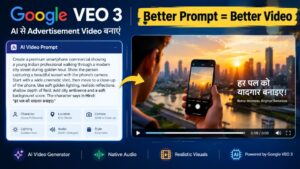
“Create a premium smartphone commercial showing a young Indian professional walking through a modern city street during golden hour. The person takes the smartphone out and captures a beautiful sunset. Start with a wide cinematic shot, then slowly move toward a close-up of the smartphone camera. Show realistic reflections and natural hand movement. Premium commercial photography, realistic colors, shallow depth of field. Add subtle city ambience and a soft cinematic background score. The character says in natural Hindi: ‘हर पल को यादगार बनाइए।’”
यह prompt केवल product का नाम बताने के बजाय पूरे scene को define करता है।
Google की official guidance के अनुसार character appearance, location, action, lighting, camera framing और dialogue जैसी details prompt को अधिक specific बनाने में मदद कर सकती हैं।
Product Ad का एक Practical Example
मान लीजिए आप एक coffee brand के लिए 8-second social media advertisement बनाना चाहते हैं।
आप scene को इस तरह सोच सकते हैं:
पहले कुछ moments में coffee cup और table का close-up दिखाई दे। इसके बाद camera धीरे-धीरे पीछे जाए और सुबह का warm environment दिखाई दे। Background में हल्की café ambience हो। अंत में character coffee का sip ले और एक short dialogue बोले।
इस तरह advertisement में सिर्फ product नहीं बल्कि एक छोटा visual story element भी आ जाता है।
Short-form ads में यह approach उपयोगी हो सकती है क्योंकि viewer को शुरुआत में visual hook मिलता है और product naturally scene का हिस्सा बनता है।
Google VEO 3 से बेहतर Ad बनाने के Practical Tips
सबसे पहली बात, prompt को unnecessarily complicated न बनाएं। बहुत सारे conflicting instructions देने से desired result प्रभावित हो सकता है। Google भी visual references और text prompt के बीच conflicting guidance से बचने की सलाह देता है।
दूसरी बात, एक ही generation पर निर्भर न रहें। Advertisement के लिए अलग-अलग versions बनाकर camera angle, lighting या opening shot में छोटे बदलाव करना ज्यादा practical हो सकता है।
तीसरी बात, product visibility पर ध्यान दें। अगर advertisement का उद्देश्य किसी product को promote करना है, तो product scene में बहुत छोटा या अस्पष्ट नहीं होना चाहिए।
चौथी बात, dialogue छोटा रखें। Short ad में लंबा dialogue अक्सर unnecessary लगता है। Product और visual storytelling को ज्यादा space देना बेहतर हो सकता है।
पांचवीं बात, final video को manually review करें। AI-generated video में हाथ, text, product details, facial expressions, audio या object consistency जैसी चीजों में imperfections आ सकती हैं।
Reference Images का इस्तेमाल कब करें?
अगर आप किसी specific product या character की consistency चाहते हैं, तो reference images उपयोगी हो सकती हैं।
Google Flow में ingredients/references का उपयोग करके uploaded images को video generation में guide किया जा सकता है। Google की documentation के अनुसार clean reference images और consistent visual references बेहतर results के लिए मददगार हो सकते हैं।
उदाहरण के लिए किसी product की साफ image देने से AI को product की shape और visual appearance समझने में सहायता मिल सकती है।
हालांकि reference image देने के बाद भी generated result को original product के साथ compare करना जरूरी है।
Google VEO 3 की कुछ Limitations
AI video generation काफी advanced हो चुका है, लेकिन इसे traditional video production का पूरी तरह automatic replacement नहीं समझना चाहिए।
सबसे पहले, output हर generation में समान नहीं होगा। Prompt में छोटी changes से भी result बदल सकता है। Audio और dialogue generation में भी कभी-कभी unexpected output आ सकता है।
दूसरी बात, अलग-अलग Google plans, regions और models में features अलग हो सकते हैं। Google Flow की current documentation भी बताती है कि feature availability country या region के अनुसार अलग हो सकती है।
तीसरी बात, Google Veo ecosystem लगातार update हो रहा है। वर्तमान में Google का newer Veo 3.1 model भी उपलब्ध है, जो Veo 3 पर additional control, realism और audio capabilities के साथ आगे बढ़ता है।
इसलिए अगर आपके interface में Veo 3 की जगह नया model दिखाई देता है, तो यह जरूरी नहीं कि कोई समस्या हो। Google समय के साथ models और features update करता रहता है।
Ad Video Publish करने से पहले क्या Check करें?
Video तैयार होने के बाद उसे सीधे publish करने के बजाय एक बार पूरा review करें।
Product का नाम, logo, visual appearance, dialogue, audio और overall message सही है या नहीं, यह देखें। अगर advertisement में कोई price, discount या offer mention किया गया है तो उसे भी manually verify करें।
इसके अलावा किसी दूसरे व्यक्ति, brand asset या copyrighted material को बिना उचित permission के इस्तेमाल करने से बचें।
AI-generated content को भी normal marketing creative की तरह responsible तरीके से review करना जरूरी है।
FAQs
1. क्या Google VEO 3 से advertisement video बनाया जा सकता है?
हाँ, Veo का इस्तेमाल advertisement के लिए short video creatives बनाने में किया जा सकता है। आप product, scene, camera movement, lighting, dialogue और audio जैसी details prompt में describe कर सकते हैं।
2. क्या Google VEO 3 में आवाज और dialogue बनाया जा सकता है?
Veo 3 को native audio generation के साथ पेश किया गया था। इसमें dialogue, sound effects और ambient audio generate करने की capability है। Actual features model और current product availability पर निर्भर कर सकते हैं।
3. Google VEO 3 और AI video generator में क्या अंतर है?
Veo खुद Google का generative video model है, जबकि AI video generator एक broader term है। Veo को Gemini, Flow और अन्य Google products के माध्यम से access किया जा सकता है, depending on current availability.
4. क्या Google VEO 3 से बना video सीधे Google Ads में चलाया जा सकता है?
Veo का मुख्य काम video creative generate करना है, न कि advertising campaign setup करना। Generated video को publish करने से पहले उसके format, content और advertising platform की current requirements के अनुसार review करना चाहिए।
Conclusion
Google VEO 3 ने advertisement video बनाने के तरीके को काफी आसान बनाया है, खासकर तब जब आपके पास creative idea है लेकिन traditional shooting setup उपलब्ध नहीं है। Detailed prompts के जरिए product, camera movement, lighting, action, dialogue और audio को एक ही creative concept में शामिल किया जा सकता है।
फिर भी अच्छे ad के लिए केवल AI generation पर्याप्त नहीं है। एक clear concept, सही prompt, multiple variations और final human review जरूरी हैं। अगर आप AI video tools का इस्तेमाल करते हैं, तो शुरुआत छोटे advertisement concepts से करें और धीरे-धीरे अपने prompts को बेहतर बनाएं।
ऐसी ही उपयोगी और नई जानकारी के लिए Go Update Daily से जुड़े रहें।
Read Also :- Xiaomi 18 Pro Max: 8,500mAh Battery और Dual 200MP Leica Camera के साथ 23 सितंबर को लॉन्च